
Invoices & Quotes
Create, send and track invoices and quotes
Raise professional invoices and quotes in seconds, send them in a click and always know what's paid, pending and overdue. Try it free for 3 days.
Billing, the easy way
From the first quote to the final payment — every invoice in one place, organised and ready to export.
Create invoices in seconds
Build a professional, branded invoice in a couple of clicks. Save client details once and reuse them, so every invoice goes out fast and error-free.
Quotes that turn into invoices
Send polished quotes to win the work, then convert an accepted quote into an invoice without re-typing a thing.
Track paid, pending & overdue
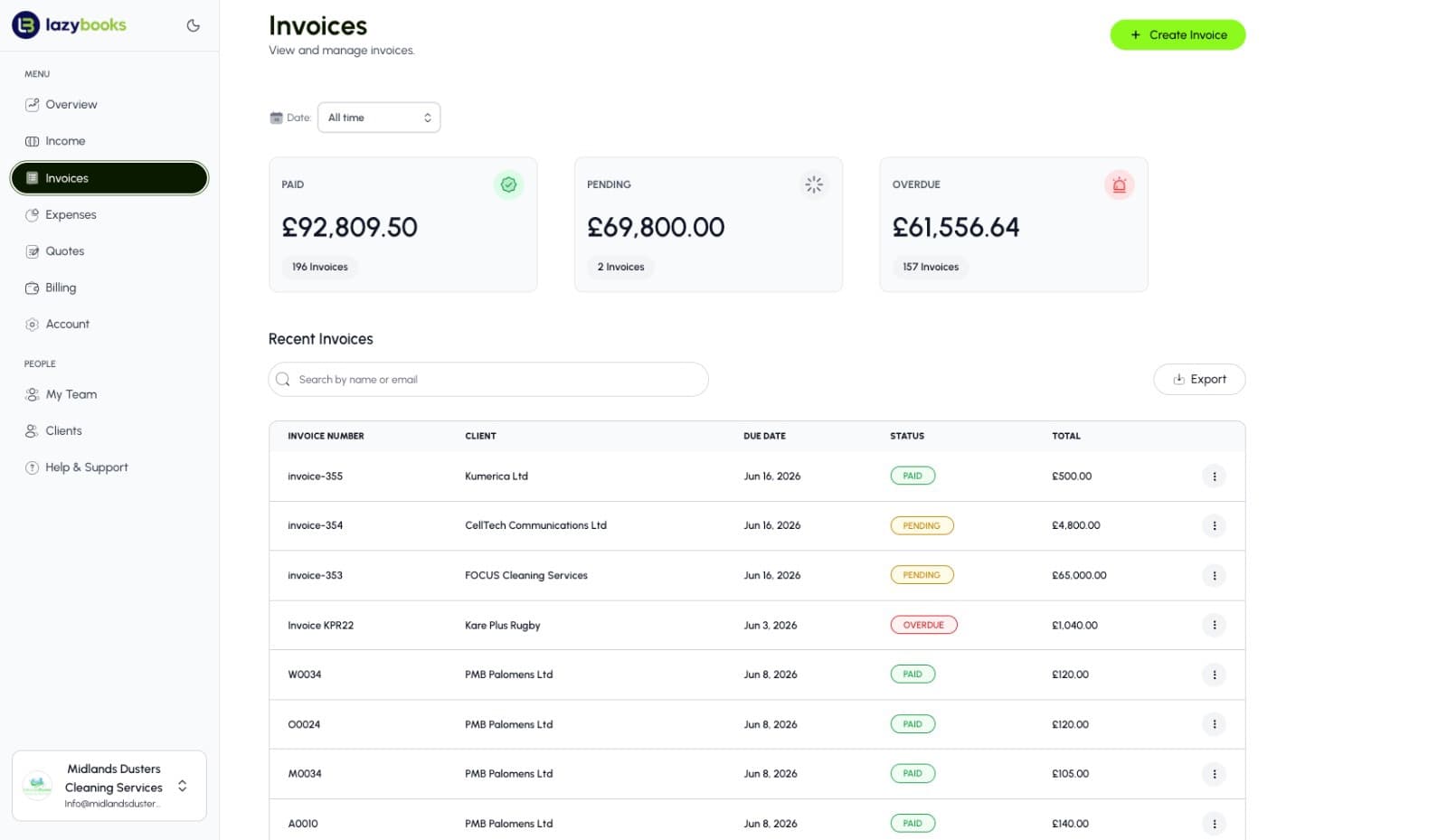
See exactly where your money is at a glance. Live totals for paid, pending and overdue invoices keep your cash flow in clear view.
Automatic payment reminders
Set reminders on every invoice so clients are nudged precisely when payment is due — no awkward chasing required.
Branded and professional
Every invoice and quote carries your logo and business details, and downloads as a clean PDF you can share or store anywhere.
Export in a click
Pull all your invoiced data into a tidy Excel (CSV) file, ready for analysis, accounting or tax season.
A closer look at invoicing
Everything you need to bill clients and stay on top of payments, built into one clean dashboard.
Know exactly where your money sits
Paid, pending and overdue totals sit right at the top of your dashboard, updated in real time. You always know how much you've earned, how much is on its way and how much needs chasing — no spreadsheets, no guesswork.

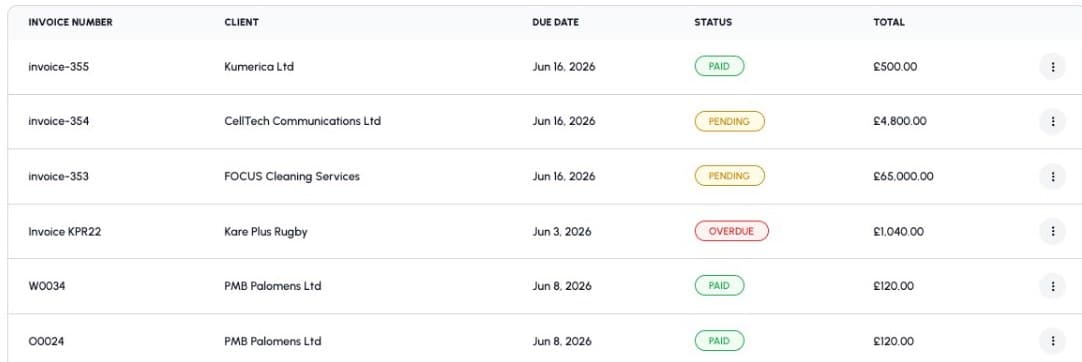
Every invoice, in one organised list
Your recent invoices live in a single, searchable list — invoice number, client, due date, status and total at a glance. Search by name or email to find any invoice in seconds, and colour-coded statuses make it obvious what still needs attention.
How invoicing works
From quote to payment in three simple steps.
Create an invoice or quote
Add your client, line items and logo. Save client details to reuse on the next one, so repeat billing takes seconds.
Send it in a click
Email a professional PDF, set the due date and switch on automatic reminders so clients pay on time.
Get paid and track
Watch invoices move from pending to paid, let overdue reminders do the chasing, and export everything for your accountant.
Invoices & quotes FAQs
The common questions about billing clients with Lazybooks.
Yes. Send professional, branded quotes to win the work, then turn an accepted quote into an invoice in a click — no need to re-enter anything.
Your dashboard shows live paid, pending and overdue totals, and each invoice is colour-coded by status. Automatic reminders nudge clients the moment a payment is due.
Every invoice and quote carries your logo and business details and downloads as a clean PDF you can share or store anywhere.
Yes. Export all your invoiced data into a tidy Excel (CSV) file whenever you need it — ideal for analysis, accounting or tax season.
Yes. Try Lazybooks free for 3 days. No credit card required and you can cancel anytime.
Join the revolution and thrive with Lazybooks
Try it free for 3 days. Cancel anytime. No credit card required.