
Expenses Management
Track spending and organise every receipt
Record expenses in real time, file receipts into folders and keep a running total of every penny — all in one secure dashboard. Try it free for 3 days.
Every expense, under control
Capture, categorise and export your spending — no manual data entry, no missing receipts.
Record expenses in real time
Log spending the moment it happens and snap the receipt on the spot. No more shoeboxes of paper or end-of-month reconciliation marathons.
Organise into folders
Group expenses into folders like Fuel, Staff Expenses or Deliverables, so every receipt lands exactly where it belongs.
Share with your team
Add team members and contractors to a folder and let them send receipts straight to it in real time — everyone's expenses, in sync.
Totals at a glance
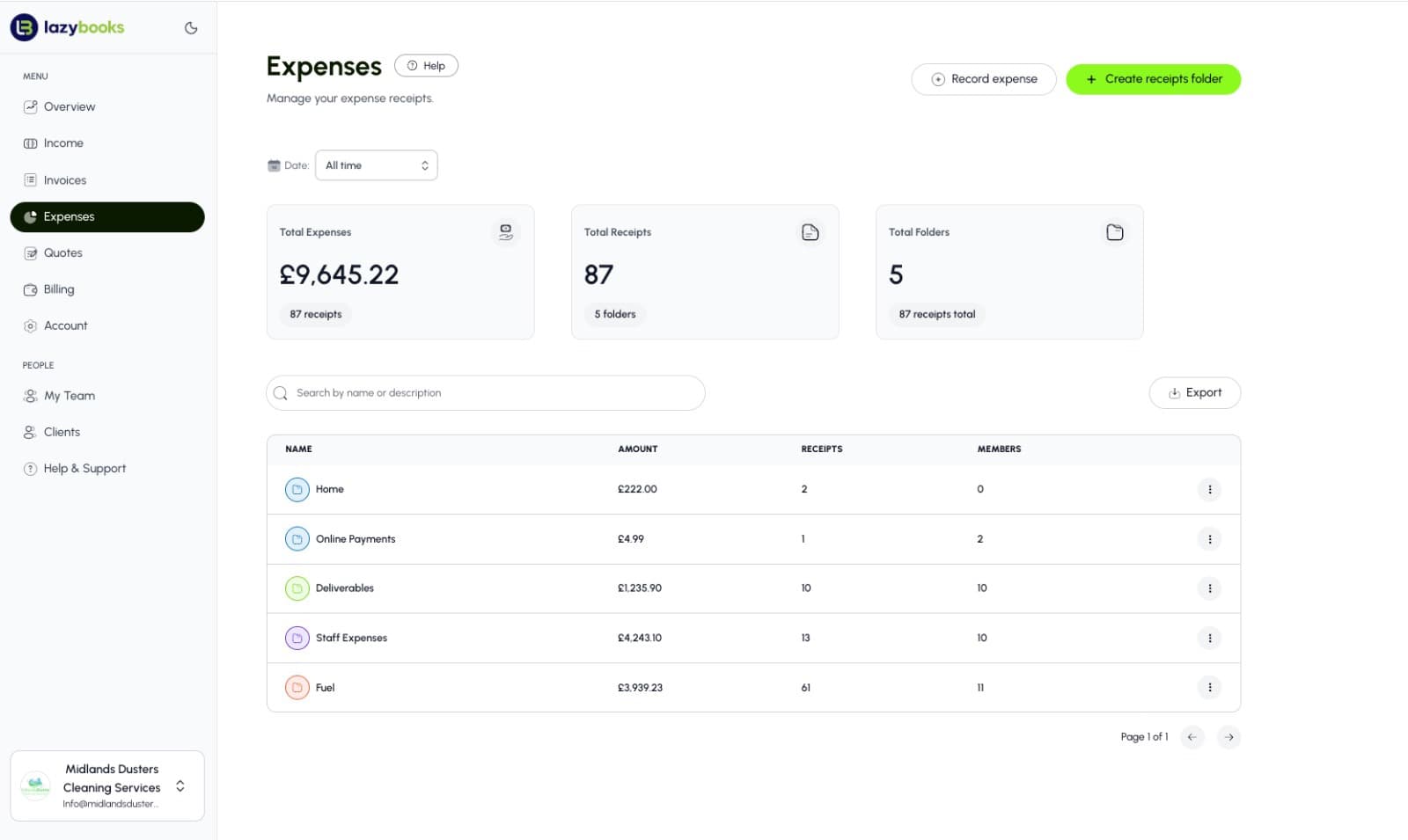
See your total expenses, receipt count and folders on one dashboard, so you always know what you've spent without doing the maths.
Secure and compliant
Industry-standard SSL and encryption keep every receipt safe. Lazybooks is ICO registered and fully GDPR compliant.
Export for accounting
Pull every expense and receipt into a clean Excel (CSV) report, ready for your accountant, analysis or tax season.
A closer look at expenses
Capture, organise and report on every penny your business spends, from one clear dashboard.
See your spending at a glance
Total expenses, total receipts and total folders sit right at the top of your dashboard. One look tells you how much you've spent and how many receipts are filed — no adding up, no surprises at month end.

Receipts, neatly filed into folders
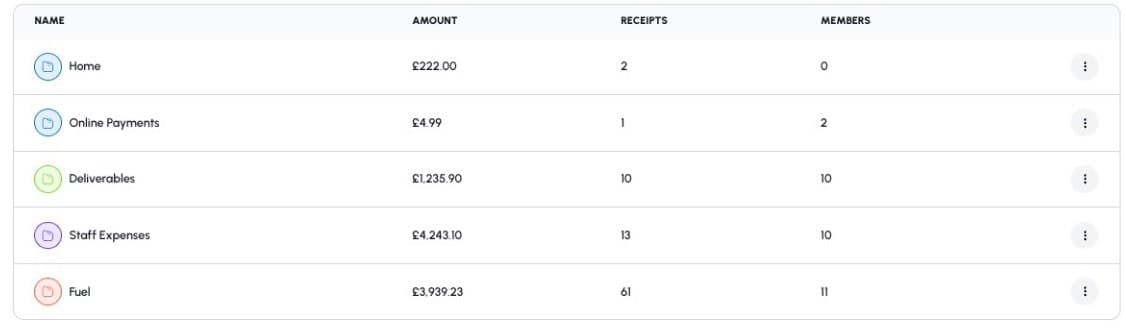
Every expense is grouped into a folder by category — Fuel, Staff Expenses, Deliverables and more — with its amount, receipt count and members in clear view. Add team members to a folder so their receipts land in the right place automatically.
How expense tracking works
From receipt to report in three simple steps.
Record an expense
Snap a receipt or record spending in seconds from any device — the moment money leaves the account.
File it into a folder
Sort each expense into a category folder like Fuel or Staff Expenses, and add your team so they can contribute too.
Track and export
Watch your running totals build across every folder, then export a clean CSV for your accountant whenever you need it.
Expenses management FAQs
The common questions about tracking expenses with Lazybooks.
Yes. Snap a photo of any receipt on the Lazybooks app and it's captured instantly and filed into the folder you choose — no manual data entry.
Yes. Create folders such as Fuel, Staff Expenses or Deliverables and group every expense by category, each with its own running total.
Absolutely. Add team members and contractors to a folder so they can send receipts straight to it in real time, keeping everyone's expenses in sync.
Industry-standard SSL and encryption keep every receipt safe, and Lazybooks is ICO registered and fully GDPR compliant.
Yes. Export every expense and receipt into a clean Excel (CSV) report, ready for analysis, accounting or tax season.
Yes. Try Lazybooks free for 3 days. No credit card required and you can cancel anytime.
Join the revolution and thrive with Lazybooks
Try it free for 3 days. Cancel anytime. No credit card required.